
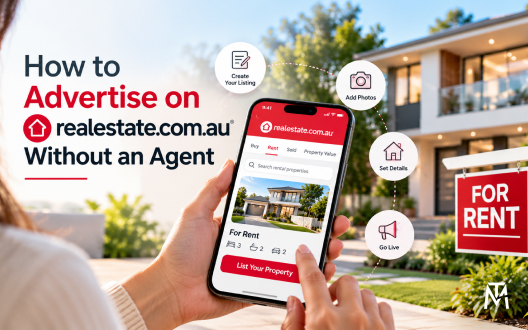
How to Advertise on realestate.com.au Without an Agent
Property owners generally access realestate.com.au through an authorised advertising provider rather than creating a private portal account. Minus The Agent supplies private-sale advertising packages that let owners prepare their listing, receive enquiries and manage the sale themselves.
Can Owners List Directly on realestate.com.au?
Property owners should check the portal’s current listing rules and access arrangements before assuming they can create an account and publish an advertisement directly. Access may depend on the type of property, the transaction and the advertising provider used.
An authorised advertising provider may offer a process for preparing and submitting a listing to the relevant property portal. Before selecting a provider, confirm that the service covers the portal you want to use and that the package suits your intended sale.
Review the provider’s terms, submission requirements and any checks that must be completed before publication. Do not assume that every advertising package includes the same portals or services.
What You Need Before Advertising
Prepare the property information before starting the advertising process. Having the details ready makes it easier to complete the listing accurately and identify missing information.
Use this checklist:
1. Property address and property type
2. Number of bedrooms, bathrooms and parking spaces
3. Accurate description of the property’s features
4. Current photographs you are authorised to use
5. Floorplan, where available and appropriate
6. Asking price or price guidance, where applicable
7. Contact details and arrangements for buyer enquiries
8. Any required property documents or disclosures
How the Private-Sale Listing Process Works
The process for advertising a property privately generally involves choosing an advertising service, preparing the listing and managing enquiries yourself. The exact submission process depends on the selected provider and the portal’s requirements.
1. Choose a residential sales package.
2. Prepare accurate property details, photos and required documents.
3. Submit the listing for provider and portal checks.
4. Manage buyer enquiries, inspections and negotiations directly.
Before paying, check the selected package, portal inclusions, advertising period, optional extras and any applicable terms. Submission does not necessarily mean that a listing will be published immediately. Provider checks, missing information or portal requirements may affect the process.
Once the listing is published, monitor enquiries and keep the property information current.
Costs and Package Inclusions
Advertising costs can vary according to the selected package, included portals, advertising period and optional services. Compare the available residential sales packages before making a decision.
Check the following details:
1. Which property portals are included
2. The advertising period
3. Listing preparation or submission requirements
4. Any optional extras and their costs
5. Payment terms and applicable conditions
6. The process for correcting or updating a listing
Read the package details and order summary before completing payment. Do not assume that a feature offered by one package is included in another.
Also distinguish advertising costs from other costs associated with selling property. Professional advice, conveyancing, inspections and other sale-related services may involve separate fees.
Frequently Asked Questions
1. Can I advertise on realestate.com.au without appointing a traditional real estate agent?
You should check the portal’s current access arrangements and the services offered by authorised advertising providers. A private-sale advertising service may provide a way to prepare and submit a listing without appointing a traditional selling agent.
2. What information do I need to prepare?
You should gather accurate property details, photographs, a description, relevant documents and contact arrangements. Check the provider’s requirements before submitting the listing.
3. Does every package include realestate.com.au advertising?
Do not assume that every package includes the same portals. Check the specific package inclusions before paying.
4. How long does it take for a listing to appear?
Timing depends on the provider’s submission process, the completeness of the information and any checks required by the portal. Confirm the expected process with the advertising provider.
5. Who manages buyer enquiries after publication?
Under a private-sale arrangement, the owner generally manages buyer enquiries, inspections and negotiations directly, subject to the services included in the selected package and any professional assistance they arrange.